Teste do controle DualSense do PS5
Conecte o DualSense por USB ou Bluetooth e confira tudo o que o navegador consegue ver: analógicos, drift, botões frontais, gatilhos e direcional.
Status do controle
Nenhum controle detectado
Conecte o controle por USB ou Bluetooth e aperte qualquer botão.
Se houver vários controles conectados, você poderá selecionar e testar cada um separadamente.
- O navegador só mostra o controle após o primeiro comando — aperte um botão frontal ou mova um analógico.
- USB e Bluetooth funcionam. Se nada aparecer, reconecte o controle e aperte um botão com esta página em foco.
- Alguns programas de remapeamento capturam o controle antes do navegador. Feche-os e recarregue a página.
- Chrome e Edge oferecem mais recursos do controle, inclusive vibração.
Referência de teste do controle PS5
Esta é uma referência de teste documentada, não uma captura ao vivo de um controle conectado atualmente a esta página.
Esta única captura preserva um relatório visível no navegador de um DualSense. Ela documenta somente esse resultado registrado; não é uma pesquisa de compatibilidade nem uma afirmação universal sobre o desempenho do hardware.
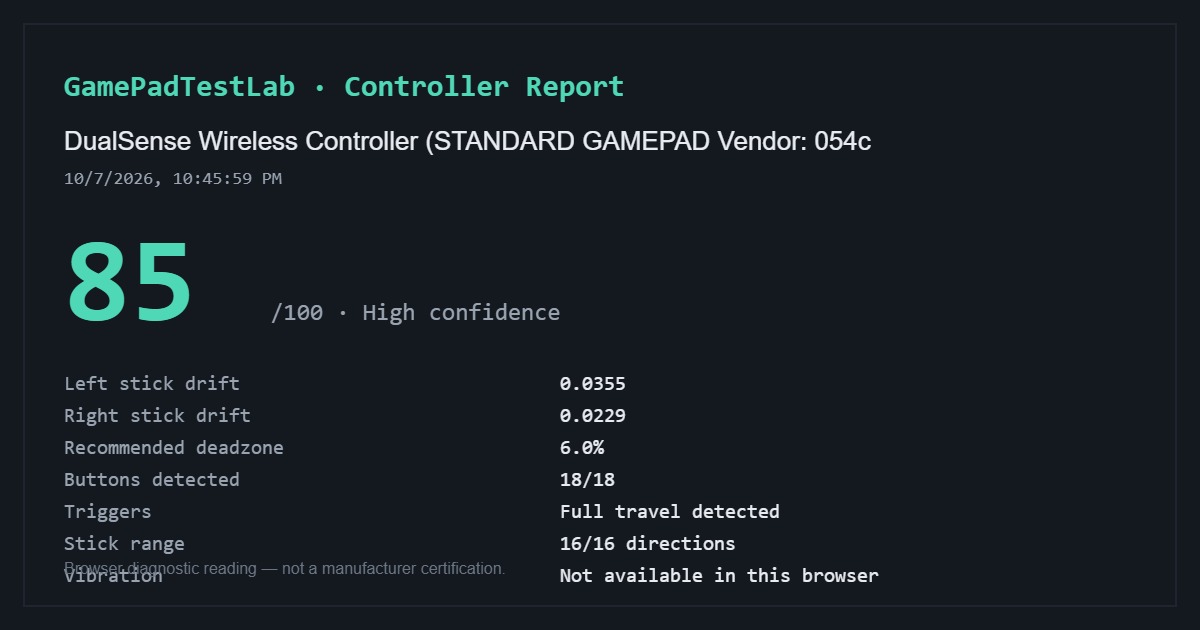
Relatório DualSense documentado — 85/100
Capturado: 10/7/2026, 10:45:59 PM (como exibido no relatório)
Identificação do navegador: DualSense Wireless Controller (STANDARD GAMEPAD Vendor: 054c)
O relatório capturado mostra drift de 0.0355 no analógico esquerdo e 0.0229 no direito, zona morta recomendada de 6.0%, 18/18 botões detectados, curso completo dos gatilhos, 16/16 direções dos analógicos e vibração indisponível naquele navegador.
Este é apenas um teste registrado. O método de conexão, o estado do software de compatibilidade, o navegador e o sistema operacional não foram registrados; o nome do controle, sozinho, não comprova o transporte usado.
Consulte a metodologia de testes para entender o cálculo e os limites das leituras visíveis no navegador.
Entrada ao vivo
Pressione qualquer comando — o diagrama reage na hora
Teste de drift do analógico
Medição cronometrada dos dois analógicos em repouso
Conecte um controle e aperte qualquer botão para ativar este teste.
Teste de botões
Pressione cada botão uma vez — ele acenderá quando o navegador o detectar
Conecte um controle e aperte qualquer botão para começar.
Teste de gatilhos
Pressione lentamente cada gatilho da posição de repouso até o fim várias vezes
Conecte um controle para testar os gatilhos.
Solução de problemas
Controle não detectado? Siga esta lista de verificação
Nove verificações sobre foco, cabos, pareamento Bluetooth, programas em segundo plano, controles virtuais do DS4Windows e suporte do navegador; abra apenas se o controle não aparecer.
Como conectar o DualSense
No USB, use um cabo USB-C de dados e aperte qualquer botão. No Bluetooth, segure Create e o botão PS até a barra de luz piscar e pareie pelo sistema.
Se parear mas nada aparecer aqui, aperte um botão com esta página em foco: o navegador esconde o controle até o primeiro comando.
O que o navegador alcança no DualSense
Alcança: os dois analógicos e o drift em repouso, X, Círculo, Quadrado e Triângulo, L1 e R1, o curso de L2 e R2, o direcional, L3 e R3, Create e Options e normalmente o clique do touchpad.
Não alcança: a resistência dos gatilhos adaptáveis, os hápticos finos, a barra de luz, o microfone e as coordenadas do touchpad.
Perguntas frequentes
- Dá para testar drift do PS5 sem o console?
- Sim. Conecte o DualSense a um computador e rode a medição em repouso aqui mesmo.
- Meu DualSense funciona no PS5 mas não no PC. E agora?
- Use um cabo USB-C de dados, refaça o pareamento Bluetooth e feche a Steam se o Steam Input estiver capturando o controle.
- Dá para testar os gatilhos adaptáveis?
- Dá para medir o quanto L2 e R2 são pressionados, que é o dado útil, mas a resistência adaptável não é acessível por uma página web.
Continue testando
Os dados do seu controle não saem deste dispositivo. Metodologia dos testes