PS5 DualSense Controller testen
Verbinde den DualSense per USB oder Bluetooth und prüfe jede Eingabe, die der Browser sieht: Sticks, Drift, Tasten, Schultertasten, Triggerweg und Steuerkreuz.
Controllerstatus
Kein Controller erkannt
Controller per USB oder Bluetooth verbinden und eine beliebige Taste drücken.
Wenn mehrere Controller verbunden sind, kannst du jeden einzeln auswählen und testen.
- Browser zeigen einen Controller erst nach der ersten Eingabe – Taste drücken oder Stick bewegen.
- USB und Bluetooth funktionieren. Falls nichts erscheint, Controller neu verbinden und bei aktivem Tab eine Taste drücken.
- Manche Remapping-Tools greifen vor dem Browser auf den Controller zu. Diese schließen und die Seite neu laden.
- Chrome und Edge unterstützen die meisten Controllerfunktionen einschließlich Vibration.
PS5-Controller-Testreferenz
Dies ist eine dokumentierte Testreferenz und kein Live-Screenshot eines derzeit mit dieser Seite verbundenen Controllers.
Dieser einzelne Screenshot bewahrt einen im Browser sichtbaren Bericht einer DualSense. Er dokumentiert nur dieses eine aufgezeichnete Ergebnis und ist weder eine Kompatibilitätsstudie noch eine allgemeine Aussage zur Hardwareleistung.
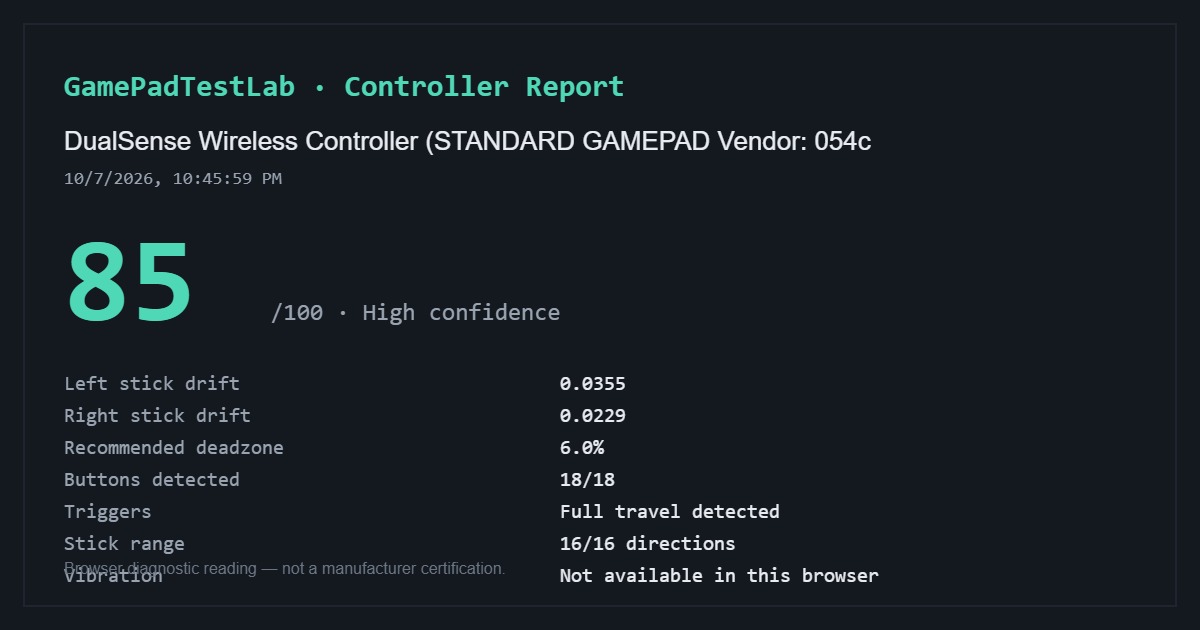
Dokumentierter DualSense-Bericht — 85/100
Aufgenommen: 10/7/2026, 10:45:59 PM (wie im Bericht angezeigt)
Browser-Identifikation: DualSense Wireless Controller (STANDARD GAMEPAD Vendor: 054c)
Der aufgenommene Bericht zeigt 0.0355 Drift am linken und 0.0229 am rechten Stick, eine empfohlene Deadzone von 6.0 %, 18/18 erkannte Tasten, den vollen Triggerweg, 16/16 Stickrichtungen und in diesem Browser nicht verfügbare Vibration.
Dies ist nur ein aufgezeichneter Test. Verbindungsart, Status der Kompatibilitätssoftware, Browser und Betriebssystem wurden nicht dokumentiert; der Controllername allein belegt die verwendete Übertragungsart nicht.
Die Testmethodik erklärt Berechnung und Grenzen der im Browser sichtbaren Messwerte.
Fehlerbehebung
Controller nicht erkannt? Gehe diese Checkliste durch
Neun Prüfungen zu Fokus, Kabeln, Bluetooth-Kopplung, Hintergrundsoftware, virtuellen DS4Windows-Controllern und Browser-Support; nur öffnen, wenn der Controller nicht angezeigt wird.
DualSense verbinden
Per USB ein datenfähiges USB-C-Kabel anschließen und eine Taste drücken. Per Bluetooth Create und die PS-Taste halten, bis die Lichtleiste blinkt, dann in den Systemeinstellungen koppeln.
Wenn der Controller koppelt, hier aber nichts erscheint: Taste drücken, während diese Seite im Vordergrund ist.
Was der Browser beim DualSense erreicht
Erreichbar: beide Sticks samt Ruhedrift, Kreuz, Kreis, Quadrat und Dreieck, L1 und R1, der Weg von L2 und R2, Steuerkreuz, L3 und R3, Create und Options sowie meist der Touchpad-Klick.
Nicht erreichbar: der Widerstand der adaptiven Trigger, feine Haptik, Lichtleiste, Mikrofon und Touchpad-Koordinaten.
Häufige Fragen
- Kann ich PS5 Stick Drift ohne Konsole testen?
- Ja. Schließe den DualSense an einen Computer an und führe hier die Ruhemessung aus.
- DualSense läuft an der PS5, aber nicht am PC — was tun?
- Datenfähiges USB-C-Kabel verwenden, Bluetooth-Kopplung neu einrichten und Steam schließen, falls Steam Input den Controller übernimmt.
- Lassen sich adaptive Trigger testen?
- Der Triggerweg von L2 und R2 wird gemessen. Der adaptive Widerstand selbst ist für eine Webseite nicht zugänglich.
Weiter testen
Die Daten deines Controllers bleiben auf diesem Gerät. Testmethodik