Prueba de mando DualSense de PS5
Conecta el DualSense por USB o Bluetooth y comprueba todas las entradas que el navegador puede ver: sticks, drift, botones frontales, gatillos y cruceta.
Estado del mando
No se detectó ningún mando
Conecta el mando por USB o Bluetooth y pulsa cualquier botón.
Si tienes varios mandos conectados, puedes seleccionar y probar cada uno por separado.
- El navegador solo muestra el mando después de recibir la primera entrada: pulsa un botón frontal o mueve un stick.
- Tanto USB como Bluetooth funcionan. Si no aparece nada, vuelve a conectar el mando y pulsa un botón con esta página en primer plano.
- Algunas herramientas de remapeo capturan el mando antes que el navegador. Ciérralas y vuelve a cargar la página.
- Chrome y Edge ofrecen más funciones del mando, incluida la vibración.
Referencia de prueba del mando PS5
Esta es una referencia de prueba documentada, no una captura en directo de un mando conectado actualmente a esta página.
Esta única captura conserva un informe visible en el navegador de un DualSense. Solo documenta ese resultado registrado; no es un estudio de compatibilidad ni una afirmación universal sobre el rendimiento del hardware.
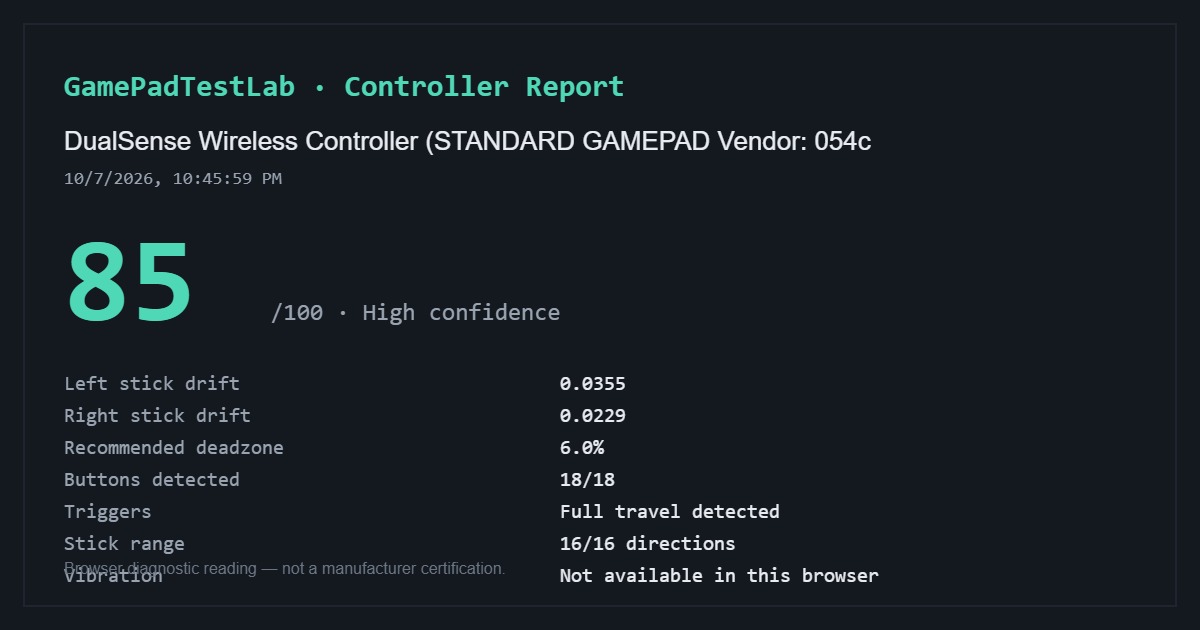
Informe DualSense documentado — 85/100
Capturado: 10/7/2026, 10:45:59 PM (tal como aparece en el informe)
Identificación del navegador: DualSense Wireless Controller (STANDARD GAMEPAD Vendor: 054c)
El informe capturado muestra un drift de 0.0355 en el stick izquierdo y 0.0229 en el derecho, una zona muerta recomendada del 6.0 %, 18/18 botones detectados, recorrido completo de los gatillos, 16/16 direcciones de stick y vibración no disponible en ese navegador.
Esta es una sola prueba registrada. No se registraron el método de conexión, el estado del software de compatibilidad, el navegador ni el sistema operativo; el nombre del mando por sí solo no determina el transporte utilizado.
Consulta la metodología de pruebas para saber cómo se calculan las lecturas del navegador y cuáles son sus límites.
Entrada en directo
Pulsa cualquier control: el diagrama reacciona al instante
Prueba de drift de los sticks
Medición en reposo cronometrada de ambos sticks analógicos
Conecta un mando y pulsa cualquier botón para activar esta prueba.
Prueba de botones
Pulsa cada botón una vez; se iluminará cuando el navegador lo detecte
Conecta un mando y pulsa cualquier botón para empezar.
Prueba de gatillos
Pulsa lentamente cada gatillo desde la posición de reposo hasta el fondo varias veces
Conecta un mando para probar los gatillos.
Solución de problemas
¿No se detecta el mando? Sigue esta lista de comprobación
Nueve comprobaciones sobre foco, cables, Bluetooth, software en segundo plano, mandos virtuales de DS4Windows y compatibilidad del navegador; ábrelo solo si el mando no aparece.
Cómo conectar un DualSense
Por USB, usa un cable USB-C de datos y pulsa cualquier botón. Por Bluetooth, mantén Create y el botón PS hasta que la barra luminosa parpadee y empareja desde el sistema.
Si se empareja pero no aparece nada aquí, pulsa un botón con esta página en primer plano: los navegadores ocultan el mando hasta la primera señal.
Qué puede y qué no puede ver el navegador
Sí: ambos sticks y su drift en reposo, Cruz, Círculo, Cuadrado y Triángulo, L1 y R1, el recorrido de L2 y R2, la cruceta, L3 y R3, Create y Options, y normalmente el clic del panel táctil.
No: la resistencia de los gatillos adaptativos, las hápticas finas, la barra luminosa, el micrófono ni las coordenadas del panel táctil.
Preguntas frecuentes
- ¿Puedo probar el drift de PS5 sin la consola?
- Sí. Conecta el DualSense a un ordenador y ejecuta aquí la medición en reposo; no hace falta la PlayStation.
- Mi DualSense funciona en PS5 pero no en PC, ¿qué hago?
- Usa un cable USB-C de datos, vuelve a emparejarlo por Bluetooth y cierra Steam si está capturando el mando con Steam Input.
- ¿Se pueden probar los gatillos adaptativos?
- Se mide cuánto se pulsan L2 y R2, que es el dato útil, pero la resistencia adaptativa no es accesible desde una web.
Sigue probando
Los datos de tu mando no salen de este dispositivo. Metodología de las pruebas